
We Rebuilt Our Chat Engine with LangGraph. Here's Why.
Our first chat pipeline answered questions. It fell apart the moment users tried to do anything more. We rebuilt it with LangGraph — and it changed what's possible.
Picture this.
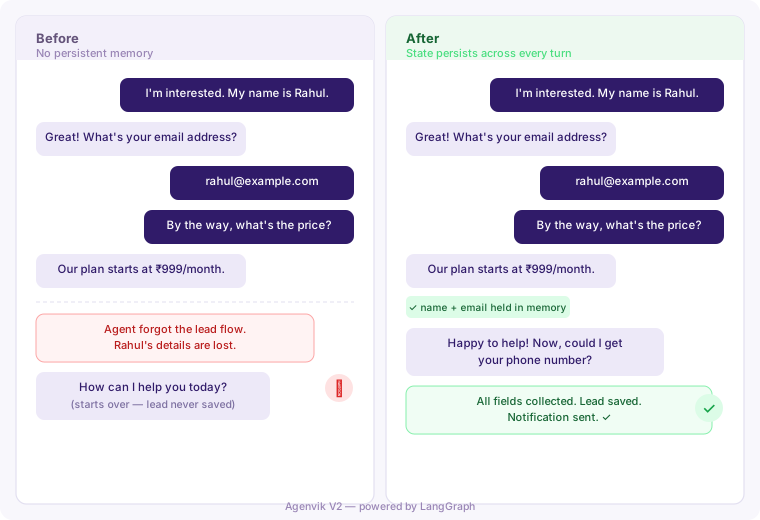
A user messages your AI agent: "I'm interested. My name is Rahul."
The agent replies: "Great! What's your email address?"
Rahul types his email. Then asks: "By the way, what's the price?"
The agent answers the price question — and then completely forgets it was collecting Rahul's contact details. Lead lost. Conversation dead.
That was Agenvik six months ago. And it wasn't a bug. It was a fundamental limitation of how we'd built the chat pipeline. Fixing it required tearing out the core and rebuilding with a different mental model. We chose LangGraph — and it changed what our agents can do.
Here's what we learned.
The Trap We Built Ourselves Into
The first version of Agenvik's chat engine was elegant in its simplicity: a user sends a message, the agent searches its knowledge base, generates an answer, done.
For question answering, this is great. A customer asks about your refund policy — they get an answer. A prospect asks about pricing — instant reply. Clean, fast, useful.
The trap is that most real business conversations aren't single exchanges. They're processes. Lead capture. Booking flows. Qualification sequences. These require the agent to:
- Remember what it's already learned about the user
- Know what it still needs to collect
- Ask for things one at a time without losing the thread
- Take action once it has everything — save a record, send a notification, call an API
Our first system couldn't do any of this reliably. It had no persistent memory between messages. Every turn started from scratch. To fake multi-step behavior, we parsed conversation history manually, tracked state in ad-hoc ways, and added if-else branches that multiplied every time we added a feature.
It worked, barely. But it was fragile — and every new capability made it more so.
Why LangGraph
We looked at a few approaches. We could have built our own state machine. We could have made the conversation history the source of truth and asked the LLM to reconstruct context on every turn (expensive and unreliable). We could have kept patching V1.
We chose LangGraph because it's built for exactly this problem: stateful, multi-step AI workflows.
LangGraph lets you model a conversation as a graph — a set of steps with defined connections and routing logic between them. More importantly, it handles state persistence natively. After each message, the current state of the conversation — what the user has shared, where they are in a flow, what's been completed — is saved automatically. When the next message arrives, the conversation resumes from exactly where it left off.
That single property — state that survives across turns — is what unlocked everything else.
What Actually Changed
Conversations now have memory.
Not fake memory built from parsing chat history, but real structured state that carries forward between messages. If a user gives their name in message two, the agent knows it in message seven without having to re-derive it. If the user goes off-topic mid-flow, the agent handles it and comes back. Nothing is lost.
The agent understands intent before it responds.
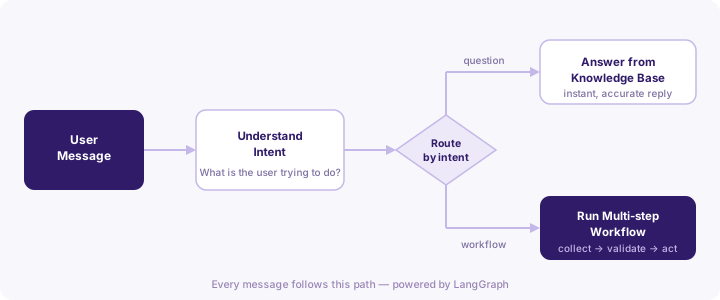
Every message is now classified before the agent does anything else. Is this user asking a general question? Trying to submit a lead? Requesting a demo? Depending on the answer, the conversation takes an entirely different path. This is what makes agents feel natural rather than robotic — they respond to what you're trying to do, not just the literal words you typed.
Multi-step workflows complete reliably.
An agent can collect information over several turns, verify it has everything it needs, and then trigger a sequence of actions — save a lead, send a confirmation email, call a webhook — in order. Each step runs only when its prerequisites are met. No duplicate submissions. No partial completions.
LangGraph's persistence layer handles the rest.
State is written to the database after every message. Server restarts, network blips, browser refreshes — none of these break a conversation in progress. A user halfway through a booking flow comes back to exactly where they were. This sounds like a small thing. For businesses that rely on these agents to capture leads or handle support, it's the difference between something they can trust and something they can't.
What This Means If You're Building on Agenvik
Concretely, here's what's different:
Lead capture works the way you'd expect. The agent collects fields one at a time, naturally. If the user asks a question mid-flow, the agent answers it and continues collecting. When everything's in, the action fires — once, correctly.
You can build multi-step flows, not just Q&A. Booking sequences, qualification flows, support escalations — anything that requires back-and-forth to complete is now a first-class thing you can configure.
Agents don't forget. Whatever a user has told the agent in a conversation is available for the rest of that conversation. You don't need to engineer workarounds for this. It just works.
The Honest Takeaway
Rebuilding the core of a product is never the first choice. We did it because V1 had a ceiling we kept hitting, and patching our way past it wasn't working.
LangGraph gave us the right primitives: state, persistence, conditional routing. The mental shift — from thinking about AI as a function that takes input and returns output, to thinking about it as a process that runs over time — is what made the difference.
If you're building AI agents that need to do more than answer questions, that mental shift is the most important thing we can share.
Ready to build your AI agent?
Start free — no credit card required.